How to Create a Virtual Situation Room with Python
Creating a virtual situation room with Python is straightforward using the Eyeson API. By leveraging Python's requests library, you can quickly set up a secure video meeting environment that mimics a traditional situation room.
Start a Meeting
Setup
This example uses Python 3.12.4. Before running the script, ensure that all required libraries used for making HTTP requests are installed:
pip install requests
To use Eyeson, you must have a valid API key. You can obtain one from the Eyeson API Dashboard.
Code Overview
When the script is executed, it prompts for your API key and user name. In the options, sfu_mode is disabled, allowing you to access MCU mode features even when only a single participant is present in the meeting. The configuration also uses a modern widescreen aspect ratio and a custom background_color.
On a successful run:
access_keyis returned, enabling modifications to the meeting room while it is running.room.idcan be used to forward sources to a WHIP endpoint or to connect drones via Ghost Client.links.guest_joinprovides a URL to invite participants to the running meeting room.- Finally,
links.guiis opened using Python'swebbrowsermodule to simulate an active user session.
import requests
import json
import webbrowser

key = input("\033[33mEnter your API key: \033[0m").strip()
name = input("\033[33mEnter your name: \033[0m").strip()

address = "https://api.eyeson.team"
headers = {
    'Authorization': key,
    'Content-Type': 'application/json',
    'Accept': 'application/json'
}
payload = {
    'user': {
      'name': name,
      'id': name
    },
    'options': {
        'sfu_mode': 'disabled',
        'widescreen': True,
        'background_color': '#6900FF'
    }
}
try:
    response = requests.post(address + '/rooms', headers=headers, json=payload, timeout=100)
    response.raise_for_status()
    try:
        data = response.json()
    except json.JSONDecodeError as e:
        print(f"\033[31mFailed to decode JSON response: {e}\033[0m")
        print(f"\033[33mRaw response: {response.text}\033[0m")
        exit(1)

    access = data['access_key']
    room = data['room']['id']
    guest = data['links']['guest_join']
    gui = data['links']['gui']

    print(f"\n\033[32mEyeson room created!\033[0m")
    print(f"Access key: \033[36m{access}\033[0m")
    print(f"Room ID: {room}")
    print(f"Guest link: \033[35m{guest}\033[0m")
    print(f"GUI link: {gui}")
    webbrowser.open(gui)
except requests.exceptions.RequestException as e:
    print(f"\033[31mRequest failed: {e}\033[0m")
C:\> python meeting.py
Enter your API key: <YOUR_API_KEY>
Enter your name: <YOUR_NAME>

Eyeson Room Created!
Access key: m4SXo1jyAUsrxDrElcGK2hkU
Room ID: 69394444df3181ee664d8e61
Guest link: https://app.eyeson.team/?guest=5TmP3RvYKfO4EObeJKsymaPJ
GUI link: https://app.eyeson.team/?m4SXo1jyAUsrxDrElcGK2hkU
Change Layout
The access_key of a room allows you to make changes to an active meeting. The most commonly used endpoint is layouts. Additionally, the same user name is entered as user.id to assign the user to a specific spot within the meeting layout.
import requests

access = input("\033[33mEnter access key: \033[0m").strip()
name = input("\033[33mEnter your name: \033[0m").strip()

endpoint = f"https://api.eyeson.team/rooms/{access}/layout"
map = '[[20, 80, 400, 400, "auto"],[440, 160, 400, 400, "contain"],[860, 240, 400, 400, "cover"]]'
payload = {
    'layout': 'custom',
    'name': 'custom-map',
    'users[]': ['', name, ''],
    'map': map
}
try:
    response = requests.post(endpoint, data=payload, timeout=30)
    response.raise_for_status()
    print("\n\033[32mLayout request successful!\033[0m")
except requests.exceptions.RequestException as e:
    print(f"\033[31mRequest failed: {e}\033[0m")
C:\> python layout.py
Enter access key: xPWTxLith3Ms0ighYNEMLTrP
Enter your name: test

Layout request successful!
Add Background
The second most used endpoint is layers. The process is pretty much the same as bevor.
import requests

access = input("\033[33mEnter access key: \033[0m").strip()

endpoint = f"https://api.eyeson.team/rooms/{access}/layers"
image = "https://docs.eyeson.com/img/examples/background_example.png"
payload = {
    'url': image,
    'z-index': -1 #background layer
}
try:
    response = requests.post(endpoint, data=payload, timeout=30)
    response.raise_for_status()
    print("\n\033[32mLayer request successful!\033[0m")
except requests.exceptions.RequestException as e:
    print(f"\033[31mRequest failed: {e}\033[0m")
C:\> python layout.py
Enter access key: xPWTxLith3Ms0ighYNEMLTrP

Layout request successful!
Forward Playback
In meeting.py we printed the room.id to use it later.
One of Eyeson's popular features is forwarding.
The whip_endpoint must be the same on the AI server.
import requests
from time import sleep

key = input("\033[33mEnter your API key: \033[0m").strip()
room = input("\033[33mEnter room ID: \033[0m").strip()
access = input("\033[33mEnter access key: \033[0m").strip()

playback_endpoint = f"https://api.eyeson.team/rooms/{access}/playbacks"
playback = "https://docs.eyeson.com/video/eyeson_test.mp4"
playback_id = "test_video"

playback_payload = {
    'url': playback,
    'play_id': playback_id,
    'loop_count': -1 #infinite loop
}
try:
    playback_response = requests.post(playback_endpoint, json=playback_payload, timeout=30)
    playback_response.raise_for_status()
    print("\n\033[32mPlayback request successful!\033[0m")
except requests.exceptions.RequestException as e:
    print(f"\033[31mPlayback request failed: {e}\033[0m")

sleep(1)

forward_endpoint = f"https://api.eyeson.team/rooms/{room}/forward/playback"
forward_id = "forward_video"
whip_endpoint = f"https://1fa5c97ee6da.ngrok-free.app/whip/{forward_id}"

forward_headers = {
    'Authorization': key,
    'Content-Type': 'application/json',
    'Accept': 'application/json'
}
forward_payload = {
    'forward_id': forward_id,
    'play_id': playback_id,
    'type': 'video',
    'url': whip_endpoint
}
try:
    forward_response = requests.post(forward_endpoint, headers=forward_headers, json=forward_payload, timeout=100)
    forward_response.raise_for_status()
    print("\033[32mForward request successful!\033[0m")
except requests.exceptions.RequestException as e:
    print(f"\033[31mForward request failed: {e}\033[0m")
C:\> python layout.py
Enter access key: YOUR_API_KEY>
Enter room ID: 69394444df3181ee664d8e61

Playback request successful!
Forward request successful!
Result
If meeting.py, layout.py & layers.py execute successfully, the expected output will be as shown below.
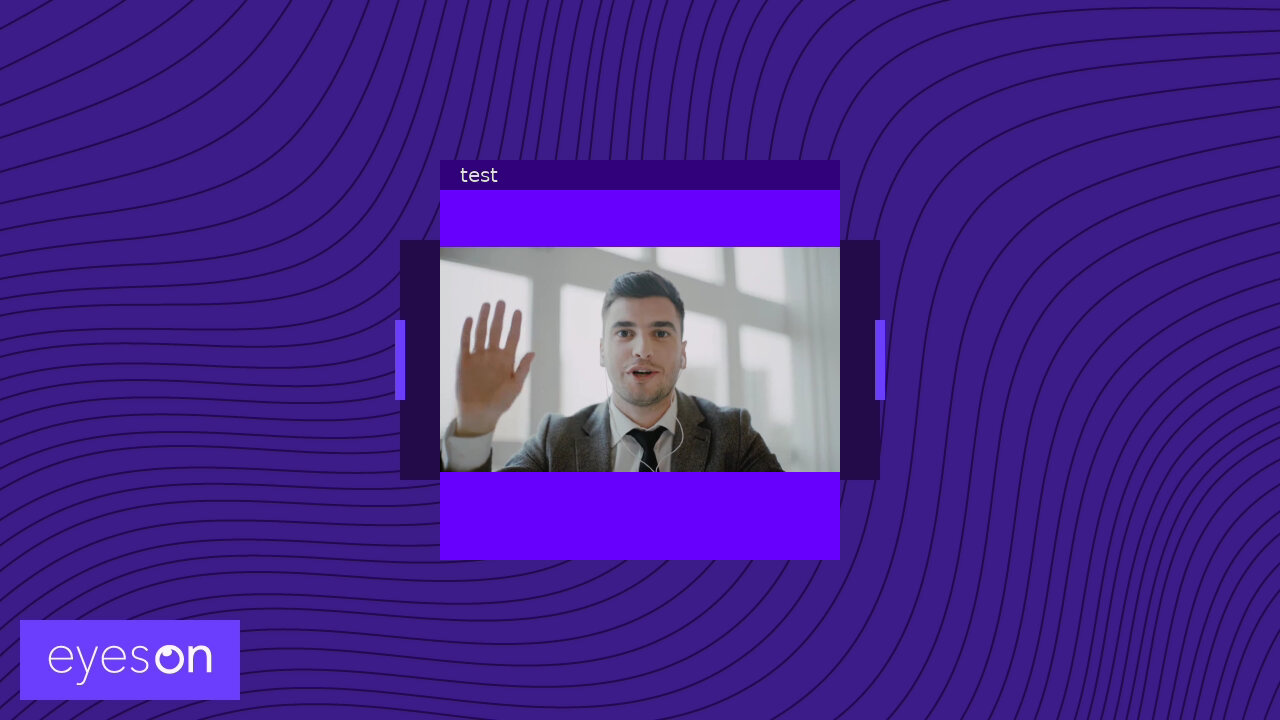
All of these scripts can be combined into a single script, and additional features from the REST Reference can be integrated. The last example serves as a starting point or bridge for other Python projects, such as forwarding audio to AI or running Eyeson on a NVIDIA Jetson board.